
See your site the way visitors abroad see it. Real servers in 44 countries load your page, capture a real-browser screenshot and report the status, speed and DNS for each location. Free, with no sign-up.
Loading…
Click a country to add or remove it, or use Add countries.
| Country | Location · network | Result | Total | First byte | Timing | Server IP | Headers |
|---|
Countries with real test
servers
Browser engines: Chrome, Firefox and Safari
Device sizes, from phone to 1920 px desktop
Days of scan history with screenshots
Quick answer
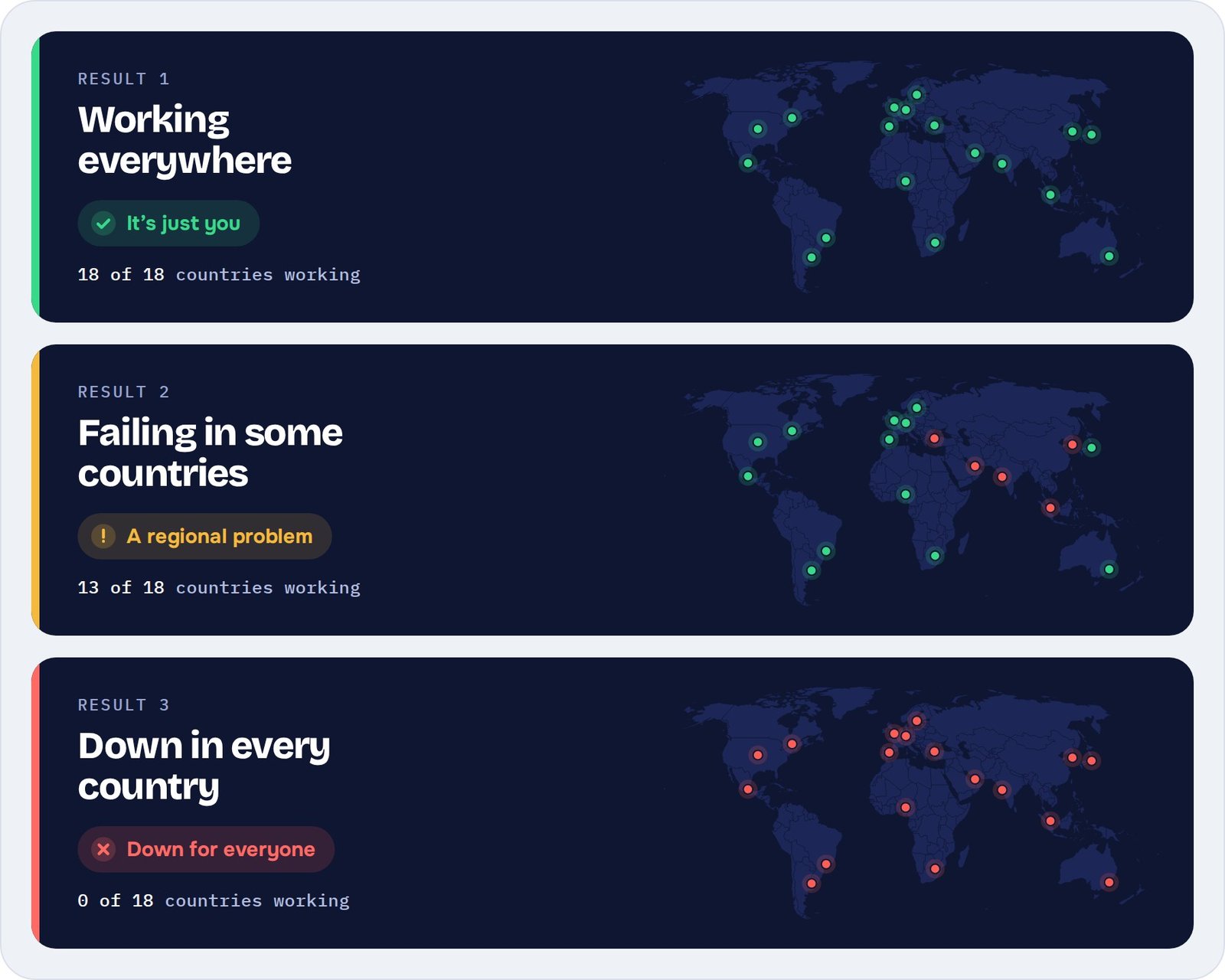
When a site won’t load, the first question is whose problem it is. Run one test and the results tell you:
What it catches
Most outages are local: a firewall rule, a CDN edge, a redirect meant for one market. DownForEveryone loads your page from each country and shows exactly what visitors get, so you can check your website from different countries without a VPN.
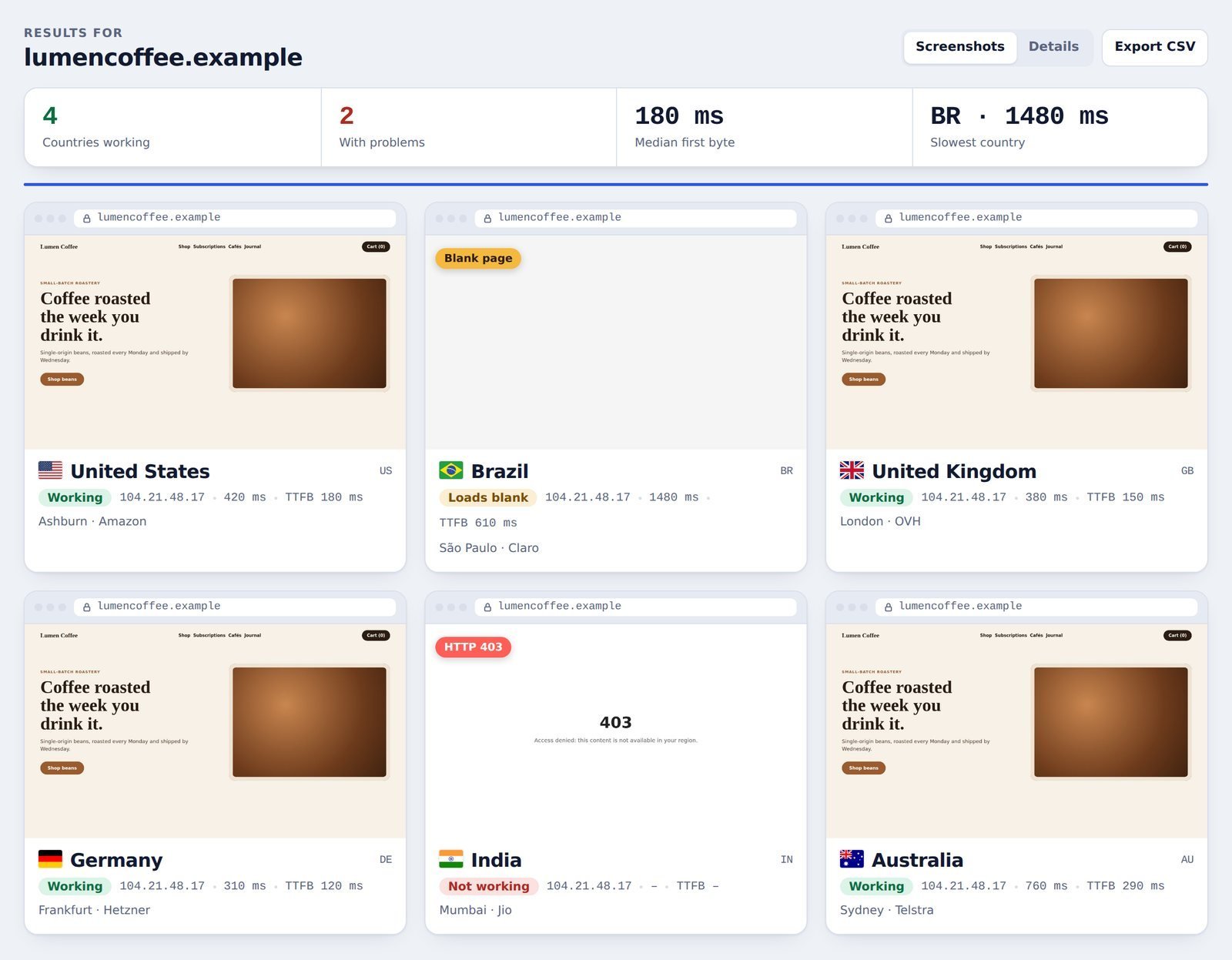
The page loads but shows nothing, because a script is blocked in one region or a CDN is serving an empty shell. Each result flags it.
Time to first byte and full load time per country, split into DNS, connect, TLS and server wait, so the slow step stands out.
Error 403, "not available in your region" pages, over-strict security plugins or forgotten Cloudflare rules.
Language and country redirects that send visitors to the wrong page, or around in a loop.
See which server answered and whether the page came from cache, so you know why one country is fast and another isn't.
The server IP each country actually reached, so you can catch stale records, slow DNS propagation and misconfigured geo-DNS.
The report
Every country gets a verdict, a real-browser screenshot and the numbers behind it. Problems sort to the top, so you can see in seconds where the site fails and why. Each result also names the city and network that ran the test, so you always know exactly where your data came from.
How it works
Step 1
Any public page, such as a homepage, a checkout or a campaign landing page.
Step 2
Choose where your visitors are on the map, or filter by region, then test as desktop, phone or tablet.
Step 3
Each country gets a verdict, a screenshot and timings. Problems are flagged, so you know where to look first.
Who uses it
Check a client's site from their customers' countries before launch, and send the report when something is off.
Make sure product pages, checkout and payment load where you sell, not just where your server is.
Confirm sign-up and login pages work in every market after a release, a CDN change or a DNS update.
Compare
GeoPeeker pioneered viewing a site from different locations. DownForEveryone takes the same idea further, with more countries, deeper diagnostics and everything free.
| Feature | DownForEveryone | GeoPeeker (Free Plan) |
|---|---|---|
| Test locations | 44 countries | 6 locations |
| Price | Free, no sign-up | Free plan, paid from $9/month |
| Screen sizes | 5, from phone to desktop | 1 |
| Browser engines | Chrome, Firefox, Safari | Not listed |
| Timing data | DNS, connect, TLS and TTFB per country | Ping timings |
| Blank and error page flags | Yes | Not listed |
| CSV export | Yes | Not listed |
| Scan history | 90 days with screenshots | Not listed |
Questions
Something else? Get in touch and we’ll answer.
Firewalls, CDN rules, geo-blocking, DNS differences and overloaded regional servers can all make a site fail in one region while it works in another. Testing from local servers shows which one it is.
From real servers in 44 countries. Each result shows the city and network provider that ran the test, so you know exactly where the check came from.
TTFB (time to first byte) is how long a visitor waits before the server starts sending your page. A high TTFB in one country usually points to distance from your server, a slow CDN edge or a busy backend.
Yes. Every country returns a real-browser screenshot, the status code and the timings. If a page fails to load or renders blank, the result flags it, so you see the problem instead of a gap.
Not at the moment. Tests load public pages the same way a new visitor would. To check a login flow, test the login or sign-up page itself.
It tests from more countries, in three browser engines and five screen sizes, and adds a full timing breakdown, error flags and CSV export. It’s also completely free, with no account needed.
Start now
Enter an address, pick countries and get your report in about a minute. Free, no sign-up.